
TL;DR: Shopify is the better pick for most growing stores that want to sell without managing servers, security or updates. WooCommerce wins when you need full control, a content-heavy WordPress site, or custom features Shopify can’t handle. The real choice is who does the upkeep: Shopify does it for a monthly fee, while on WooCommerce you or your developer do it. Pick based on your team, not the sticker price.
Most internet stores don’t go under because of the platform they choose. They stall because nobody thought about maintenance. That’s the true question behind Shopify vs WooCommerce and it’s the question most comparisons miss.
The top two results for this search are authored by the platforms themselves. Shopify’s comparison page indicates Shopify wins. WooCommerce comparative page says WooCommerce wins. Surely, neither can be perfect for every store.
We construct stores on both platforms at Hyer Studios, and we migrate older Magento stores over to each. So we don’t have a dog in the fight. We care about which one delivers you more sales with less hassle.
In this tutorial we’ll compare the two on cost, SEO, security, growth and selling through AI search. At the end, an easy approach to decide based on your team and your ambitions. If you want to discuss it, our ecommerce website development staff is here to help you decide.
What Is the Difference Between Shopify and WooCommerce?
Shopify is a hosted ecommerce platform that you pay for on a monthly basis; it hosts and checks out your store for you. WooCommerce is a free, open-source plugin that converts a WordPress website into a store, so you host it, protect it and update it yourself (or pay someone to do it).
Think of Shopify as a rented fully serviced shop. WooCommerce is like owning the building: greater freedom, more upkeep.
They are both large. W3Techs data, of October 2026, shows WordPress powering 40.1% of all websites and Shopify 5.4%. WooCommerce has over 7 million active installs on WordPress.org.
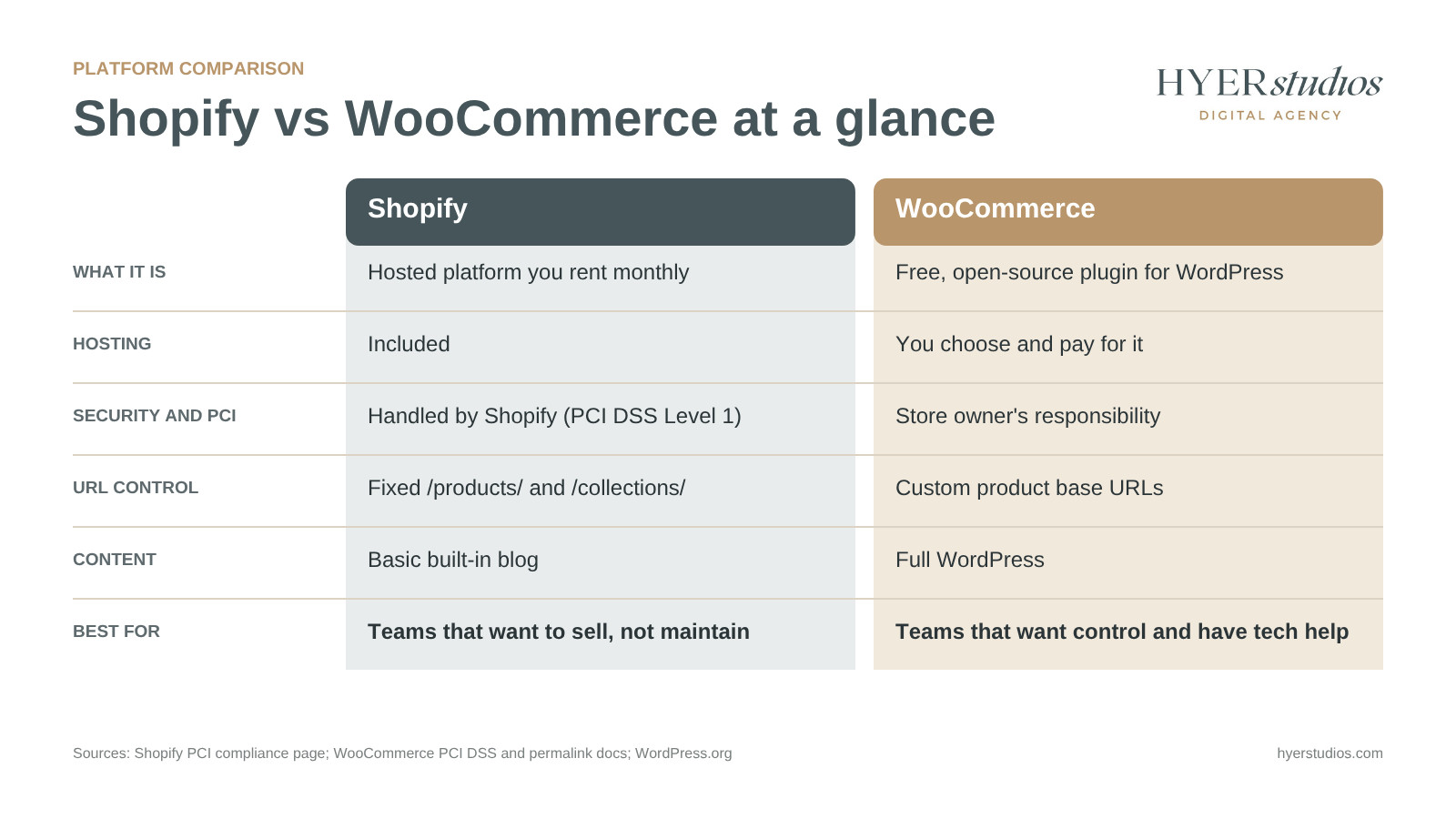
| Shopify | WooCommerce | |
|---|---|---|
| What it is | Hosted platform (software as a service) | Open-source plugin for WordPress |
| Hosting | Included | You choose and pay for it |
| Platform fee | Monthly plan | None for the core plugin |
| Security and PCI | Handled by Shopify | Your responsibility |
| URL control | Fixed paths like /products/ | Customizable |
| Content and blogging | Basic blog built in | Full WordPress |
| Custom features | Apps and theme code, within limits | Almost anything, with a developer |
| Best for | Teams that want to sell, not maintain | Teams that want control and have tech support |
Is Shopify or WooCommerce Cheaper to Run?
WooCommerce itself has no platform charge. But you have to pay for hosting, a theme, premium plugins, and someone to maintain it updated. Shopify charges a monthly subscription that covers hosting and security, then adds app costs. It is inexpensive depending on how many paid add-ons you require and who conducts your upkeep.
That’s where the money goes on each platform.
On Shopify you pay for:
- Monthly plan (hosting, security and checkout included)
- Apps for further features not included in the plan
- A paid theme if you don’t have a free one
- Processing payments for all sales
- Additional transaction cost when you use a payment provider other than Shopify Payments, as set out in Shopify’s guidelines for third party gateways
You pay for on WooCommerce:
- WooCommerce server requirements, including hosting that supports PHP 8.3 or greater and 256 MB of memory or greater
- A domain and SSL certificate (some hosts include)
- Premium add-ons, such as memberships, packages or B2B pricing
- Premium theme if required
- Handling of payments on every sale
- Updates, fixes and security time from a developer or agency
The core plugin really is free and open source. The running costs are what you need to plan for.
Be careful with the vendors’ cost studies
Both platforms give cost comparisons and both should be studied carefully. Shopify’s page references a consulting firm’s report (which it doesn’t name) on total cost of ownership savings. WooCommerce’s sample cost tables presume that most payments are made using its own WooPayments service. They each do the calculations to win.
We suggest pricing your own store. Write down all the features you need then see if it’s built-in or a paid app or paid extension on each platform.
Time to spend on updates: That number tops any vendor research. If you’re still figuring out your entire budget then our article on what a new website costs is an excellent place to start.
Shopify vs WooCommerce for SEO: Which Ranks Better?
Both platforms are able to rank well on Google. Shopify delivers you speedier pages out of the box which helps with Google’s page experience signals. WooCommerce allows you more control over URLs, site layout and content, which is useful for stores that win traffic via blogs and guides.
URL control
Shopify has static URL routes. You can’t remove those folders on a regular store. Products are under /products/ and categories are under /collections/ . It’s rarely a rankings concern, but it does limit how you build your site.
WooCommerce allows you to modify the product base URL to shop base, shop base with category or your own custom term. Google’s own ecommerce URL guidance recommends descriptive words in URLs over arbitrary IDs, and both platforms allow that.
Beware: if you modify WooCommerce permalinks on a live store, you’ll damage old URLs unless you add redirects. That’s what WooCommerce documentation states.
Crawling and robots.txt
Shopify allows editing of your robots now.Template: txt.liquid By default it already blocks cart, checkout and filtered collection pages that would create duplicate material. Shopify also warns that a bad edit “can lead to the loss of all traffic” so leave this to someone who understands what they’re doing.
With WooCommerce, you are in full control of robots.txt with WordPress and SEO plugins. That’s greater power and more ways to make a mistake.
Core Web Vitals and Speed
Shopify is the clear winner here. In HTTP Archive data from June 2025, 75.22% of Shopify sites had strong Core Web Vitals compared to 43.44% of WordPress sites. That WordPress number is for all WordPress sites, not only WooCommerce stores, but it does go to highlight how much speed is dependent on hosting and setup.
Google greatly encourages good Core Web Vitals for success in Search, it claims. A quick WooCommerce store is very possible. All you need is good hosting, a light theme and judicious plugin choices.
CONTENTS
If your growth plan is based on content (purchasing tips, how-to pieces, recipes, lookbooks), WooCommerce has the edge. It’s built on WordPress, the world’s most popular content system. Shopify’s blog is decent for a few of entries a month, but basic by contrast.
Security and Upkeep: Who Does the Work on Each Platform
This is the most practical distinction between the two and one that owners underestimate the most.
All stores on the platform are PCI DSS Level 1 compliant by Shopify. PCI DSS is the security standard for the card industry for any firm that accepts card payments. Server security , patching and checkout security is Shopify’s business . On Shopify hosting
That’s the burden the shopkeeper shoulders on WooCommerce. WooCommerce’s own documentation notes that PCI DSS compliance is ultimately the business owner’s responsibility. A hosted gateway like Stripe or Paypal lessens your liability, but does not eliminate it.
The biggest risk is the plugins. Patchstack’s State of WordPress Security in 2026 research recorded 11,334 new WordPress vulnerabilities in 2025. Of them, 91% were in plugins and 46% had no patch available when disclosed. Every plugin you add to a WooCommerce store is another thing to keep an eye on.
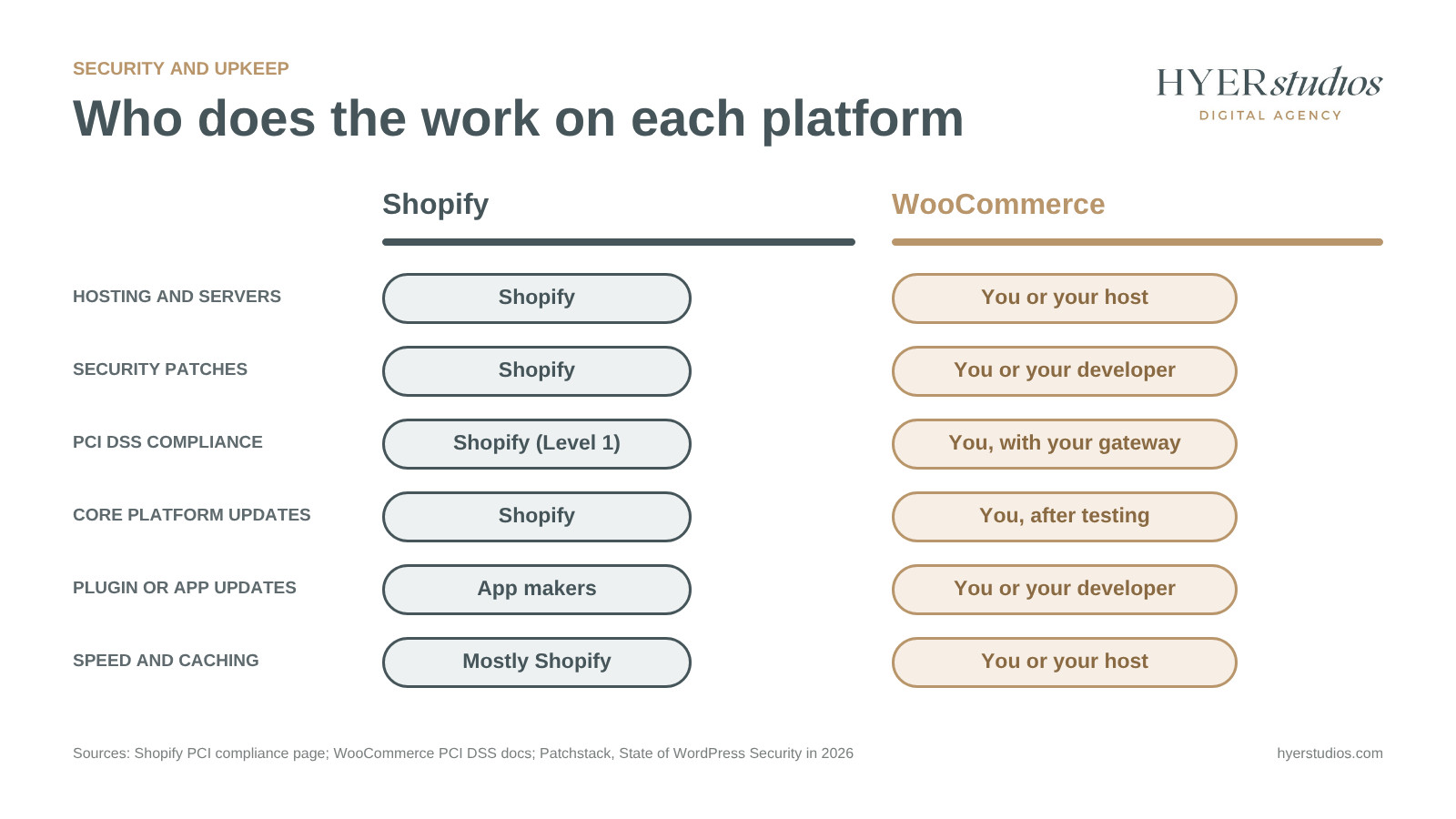
Chart of who is in charge of hosting, security patches, PCI compliance, updates and speed on Shopify vs WooCommerce
What a safe WooCommerce store needs is a routine:
- Update WordPress, WooCommerce and plugins on a schedule, following testing on staging copy
- Get rid of plugins you don’t use
- Implement daily off-site backups
- Firewall and anti-malware scanning
- Monitor security alerts on the plugins you use None of this is difficult, but someone has to own it every month. If that’s not you, then add website maintenance and security from day one.
None of this is hard, but someone has to own it every month. If that’s not you, budget for website maintenance and security from day one.
Which Platform Handles Growth Better?
Shopify scales with you and you never have to touch a server, so traffic surges and huge sales days are Shopify’s concern. WooCommerce can also handle big stores, but only if your server, database and caching scale with your orders. Growth is a technological project on WooCommerce. Growth is largely a plan update on Shopify.
HPOS is a great boost for new stores on WooCommerce. HPOS stands for High-Performance Order Storage. It pushes orders into their own database tables, not the generic WordPress ones. With the order volume increasing, it reduces load. This is enabled by default for new installs of WooCommerce 8.2 and above. Older businesses have to turn on themselves.
Where WooCommerce excels are bespoke features. It’s open source so a developer can construct pretty much anything. Crazy pricing rules, unique product builders, deep hooks into your own systems.
On Shopify, you’re limited by what the applications and theme code allow. That’s enough for most of the stores. For some it’s a wall.
Here is a typical case. Think of a wholesale dealer in restaurant equipment who sells to businesses and the general public. Trade purchasers need their own pricing lists, minimum order quantities and pay-by-invoice checkout. From the street shoppers want typical card checkout and retail prices.
A developer can create all that on WooCommerce, in one store, and connect it to the supplier’s stock system. On Shopify, the similar configuration usually includes stacking a bunch of paid applications or upgrading to a higher plan meant for B2B. When a store’s model looks like this, WooCommerce usually wins.
Here’s the simple rule we tell clients. If your growth is dependent on selling more of a fairly conventional catalog, Shopify scales with less effort. If business growth depends on capabilities that no off-the-shelf platform can provide, WooCommerce allows you the space to design them.
Selling Inside ChatGPT and AI Search
Shoppers are beginning to explore and buy things inside AI helpers. That’s another reason to compare various platforms, and right now Shopify is leading the way.
Shopify launched agentic storefronts in December 2025. The feature allows buyers to find and purchase a merchant’s products inside AI systems like Perplexity, Microsoft Copilot and Chatbot. It’s baked into the platform and Shopify merchants have access to it without any special work.
We looked and WooCommerce didn’t have a built-in alternative. Third-party plugins like WPMR Agentic Checkout, which connects a WooCommerce store to the checkout protocol from OpenAI and Stripe, allow store owners who want to sell inside ChatGPT to do so. This space is still very early for WooCommerce and that plugin had less than 10 active installs at the time of writing.
In terms of being discoverable in AI search it’s still down to the basics on either platform: clear product names, thorough descriptions, structured data, authentic reviews and the queries customers are asking. It’s the easiest way to link into AI purchasing. But it’s your content that gets you picked by AI tools.
How to Choose (and What Leaving Later Costs You)
Here’s a handy guide.
Choose Shopify when:
- You want to start swiftly and focus on selling.
- You don’t have a developer on tap
- Your catalog is quite conventional (physical products, variants, normal shipping)
- you want to sell in AI assistants and in person (point of sale is built-in) with no additional builds
Pick WooCommerce if:
- Content is a huge aspect of how you win clients.
- Need bespoke features, price or integrations
- You wish to own your code and data completely
- You have a developer or agency for the updates and security
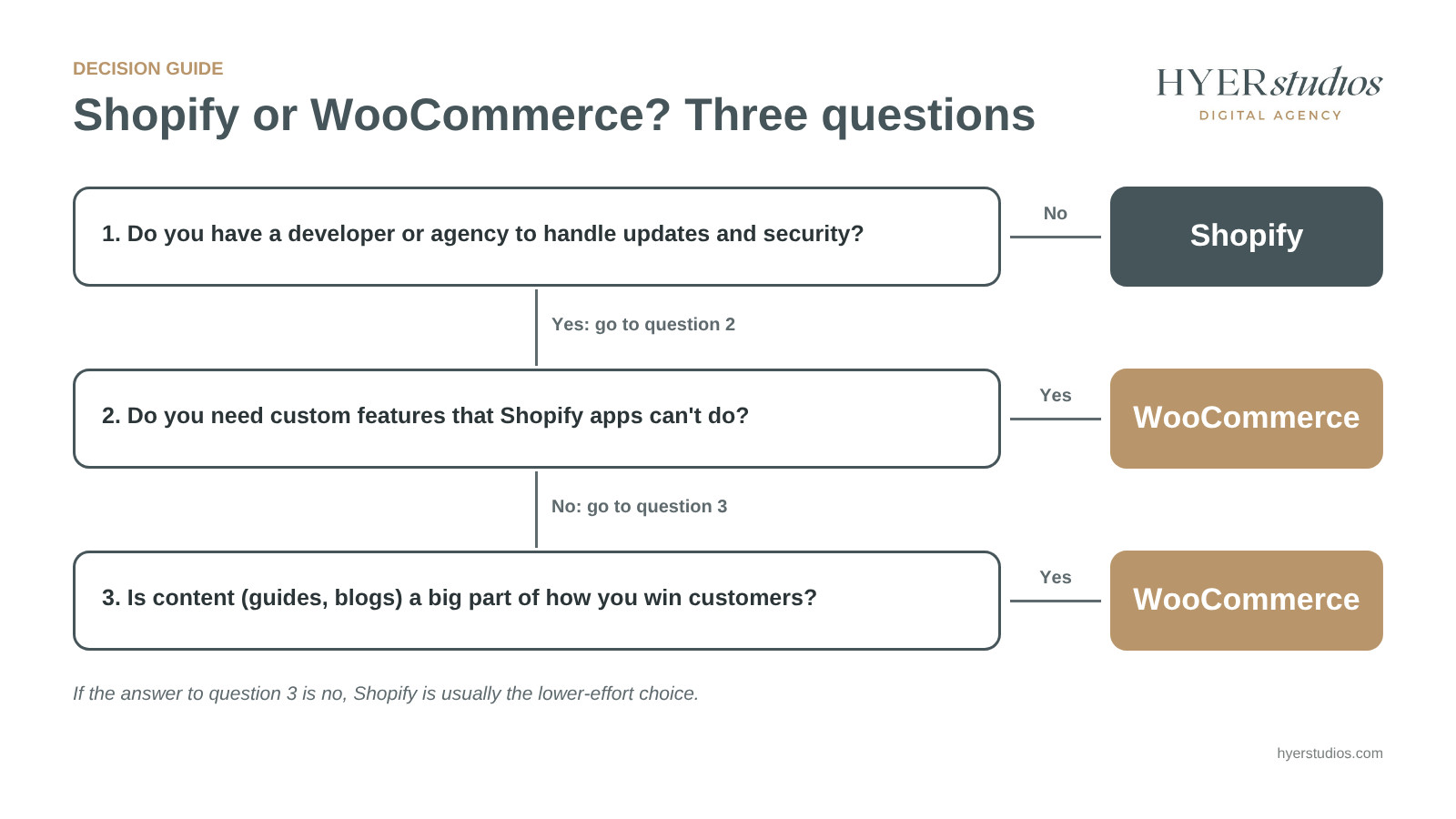
Decision guide for choosing Shopify or WooCommerce based on team, content needs and custom features
When we built the logo and Shopify store for Ino Cafe, the most crucial thing was to launch fast. In their first month they had a full booking schedule. That’s the kind of result Shopify makes simple for a small team with a new business.
Plan your exit before you enter
No platform is permanent. When Adobe discontinued support for Magento 1 on June 30, 2020, stores still running it were left without critical security patches and had to take on more of the load of maintaining PCI compliance. That deadline triggered many of our present migrations.
You can get off either platform, but not easily. Shopify product exports are in a CSV (standard ) file format and do not contain product photos. WooCommerce comes with a built-in CSV importer/exporter that can handle image URLs and variations. The challenge is, of course, to protect your ranks.
Our rule, on every move: every old URL receives a 301 redirect to its closest new page, and internal links get changed to point straight at the new URLs. We followed the same method when we cleaned up our own site, and it’s what prevents a migration wiping away years of search traffic.
If you’re on Magento today, check out our guides to Magento to Shopify migration and Magento to WooCommerce transfer. Whichever platform you choose, our ecommerce SEO services cover category pages, product data and technical fixes. Beauty brands may also see our work on beauty brand websites.
The Bottom Line
Shopify vs WooCommerce: The Final Comparison So it comes down to three things:
- Upkeep determines. Shopify hosts, secures and provides PCI for you. WooCommerce gives you the power and the maintenance that goes with it.
- SEO applies to both. Shopify loads faster. WooCommerce puts you in more control and gives you a better content engine.
- Plan your getaway today . Plan out your data export and URL redirection ahead of time.
If you are still not sure, we can help. Book a free consult and we’ll go through your catalog, your staff and your growth ambitions before the call. Whether you hire us or not you’ll walk away with a clear recommendation for one platform, and the two or three things to do right initially. It’s the platform your team will be able to run well for years to come.
Frequently Asked Questions
Is WooCommerce really free?
Yes, the WooCommerce plugin is free and open source on WordPress.org. Running a store with it isn’t free, though. You pay for hosting, a domain, any premium extensions or theme, payment processing, and the time it takes to keep everything updated and secure.
Is Shopify or WooCommerce easier for beginners?
Shopify is easier for most beginners. Hosting, security and checkout come set up, so you can focus on products and marketing. WooCommerce asks you to pick hosting, install plugins and handle updates, which suits people who are comfortable with WordPress or have a developer.
Can I switch from WooCommerce to Shopify without losing SEO?
Yes, if the move is planned carefully. Map every old URL to its new Shopify URL and set up 301 redirects before launch, because Shopify uses fixed paths like /products/ and /collections/. Then update internal links and resubmit your sitemap in Google Search Console.
Can I use WordPress and Shopify together?
Yes. Some brands keep a WordPress site for content and use Shopify to handle products and checkout. Shopify says on its WooCommerce comparison page that it integrates with WordPress. This setup gives you WordPress for content and Shopify for selling, but it means running two systems.
Which platform is better for selling through ChatGPT?
Shopify is ahead right now. In December 2025, Shopify rolled out agentic storefronts that let shoppers buy merchants’ products inside AI platforms like ChatGPT, Perplexity and Microsoft Copilot. When we checked, WooCommerce stores relied on third-party plugins for this, and those were still very new.
About the author: Brian Esper founded Hyer Studios in San Diego in 2020. He co-founded his first beauty brand in 1996 and has spent more than 20 years building and running brands online. Hyer Studios builds ecommerce stores on Shopify and WooCommerce and migrates Magento stores to both.